Solved

Phone function on an Android 16 tablet gone, always say "network busy"

  • May 13, 2026
  • 8 replies
  • 51 views

I have just received a new Teclast T65 tablet with Android 16. If you google "Teclast t65 iD mobile sim card", you can see:

The Teclast T65 (including Max and Plus models) features a dual Nano-SIM tray. It fully supports 4G LTE from UK providers like ID Mobile. Because ID Mobile runs on the Three UK network, the tablet must support Bands 3 (1800MHz) and 20 (800MHz)—which the T65 provides.

I inserted the old sim card into the tablet, Mobile data worked but no phone function. I tried all methods such as reboot, even reset mobile network settings. All no use. However, when I insert a O2 sim card and Vodefone sim, they worked no problem. Therefore, it must be problem due to the iD mobile sim.

I went to Currys, they say they do not support iD mobile. They told me there is someone from carphone warehouse can give me a new iD mobile sim. I activated the new sim card, problem is the same. 

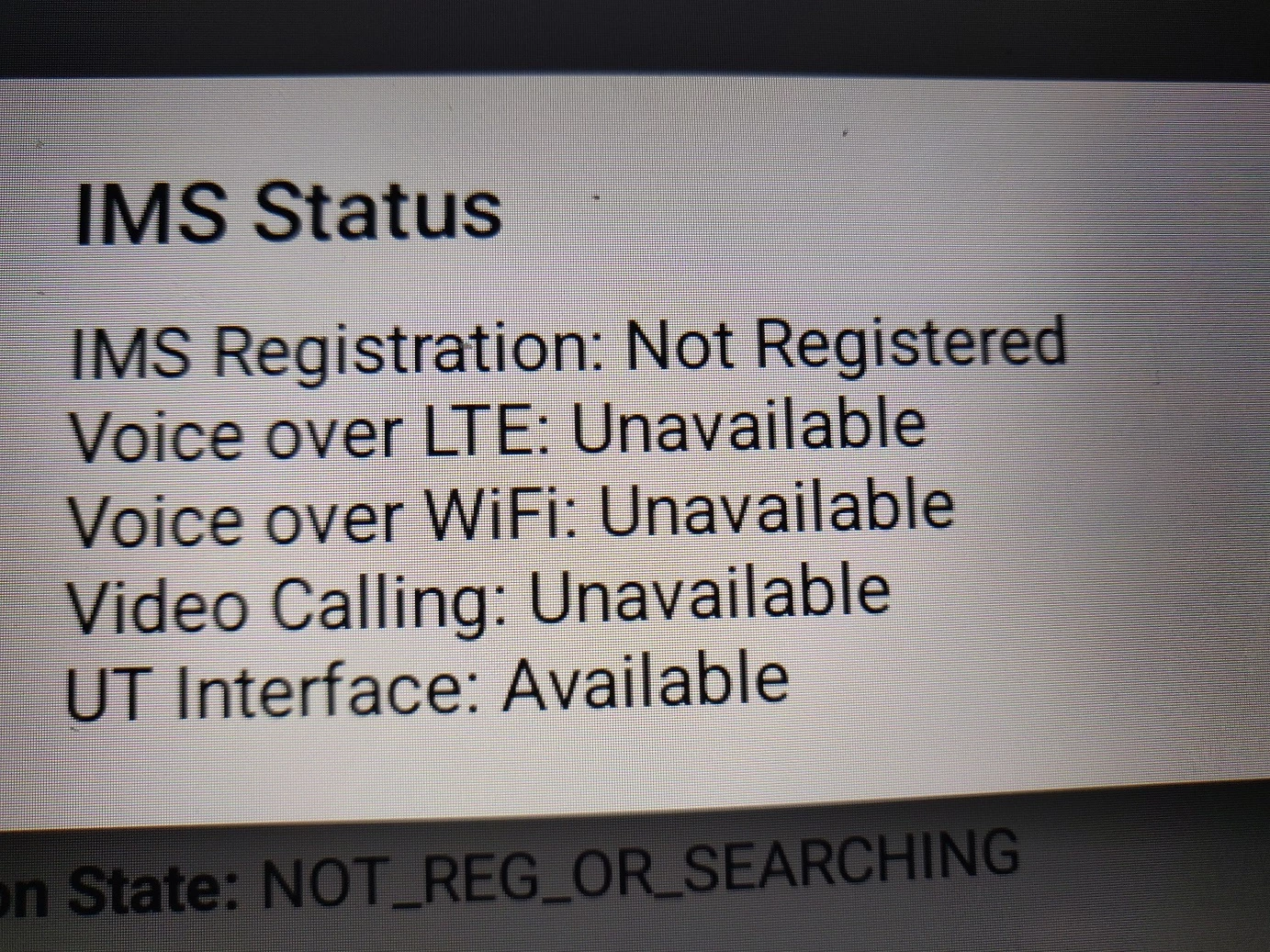
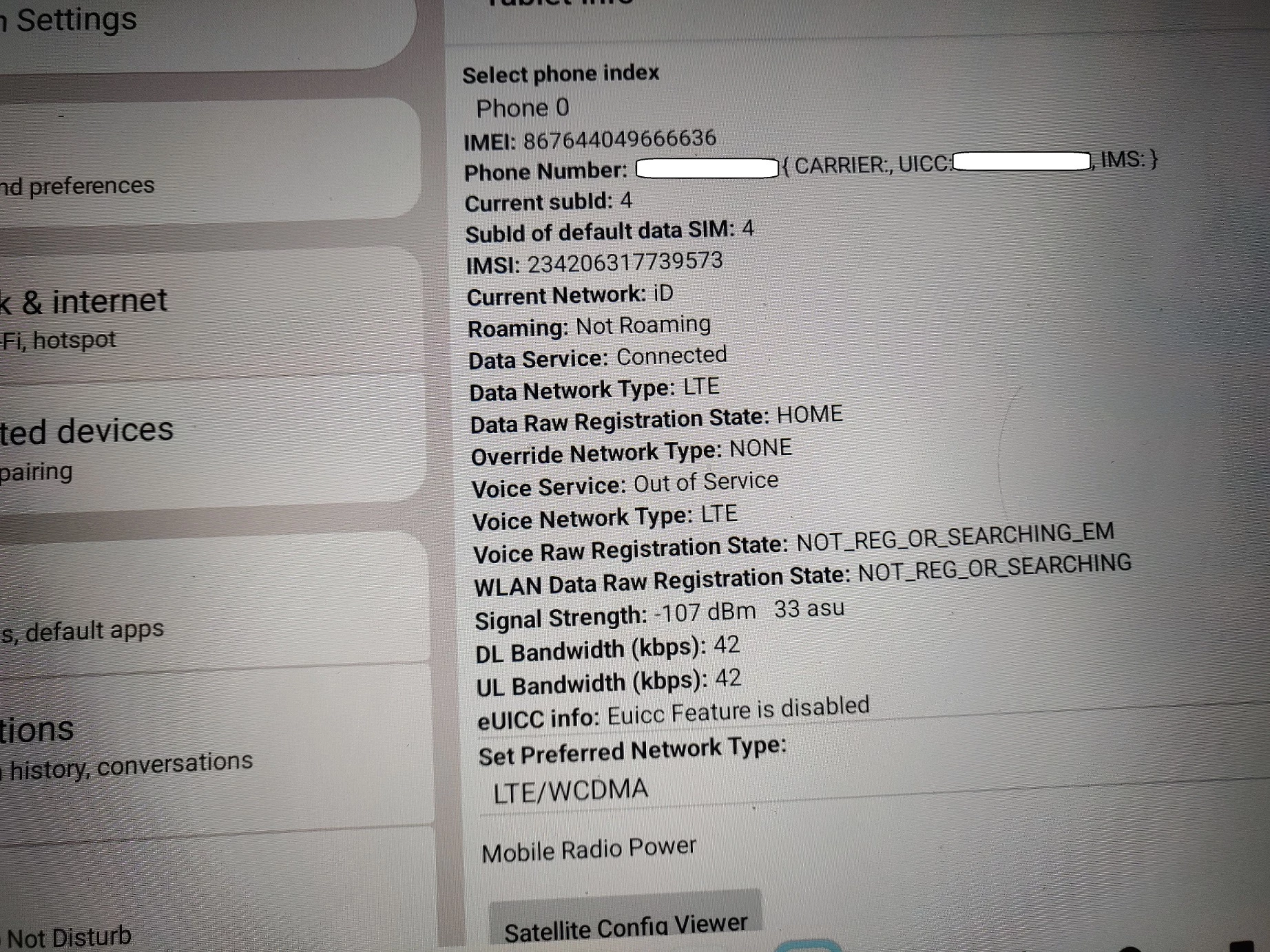
I checked the tablet information (see photos). Any help will be appreciated. 


Best answer by Owethu M

Hi ​@simon1955


Thanks for providing the detailed information and the screenshot that’s really helpful.


From what you’ve described (data working, but “Voice Service: Out of Service” on the tablet), this points to a specific limitation rather than a SIM fault.


What we can see from your device info

  • Mobile data is connecting successfully on LTE
  • The SIM is registering on the network
  • However, voice service is not registering (IMS not registered / Out of Service)
  • This is why calls and standard mobile telephony features are not working


Important clarification

iD Mobile SIMs are designed and fully supported for use in mobile handsets. While data may work in tablets (like your Teclast T65), voice services rely on VoLTE (4G Calling) being fully supported and provisioned on the device.


What’s happening here is likely:

  • The tablet supports LTE data bands (which is why internet works), but
  • It is not fully compatible with iD Mobile’s VoLTE/voice configuration, so the network cannot register the voice service
  • This results in “Out of Service” for calls even though data works


Why other SIMs appear to work

Other networks (such as O2 or Vodafone) may still allow legacy fallback or different VoLTE provisioning methods that the tablet accepts, whereas iD Mobile requires proper VoLTE registration for voice services.


What you can try (troubleshooting)

Even though this is most likely a compatibility limitation, you can try:

  1. Go to Settings > Mobile Network
  2. Ensure Preferred network type is set to LTE/4G (or LTE/WCDMA if available)
  3. Go to Access Point Names (APN) and reset to default settings
  4. Restart the tablet
  5. Reinsert the SIM and test again

Important check

Please also test your iD Mobile SIM in a compatible handset (phone).

  • If voice works in a phone → SIM is fine, device limitation confirmed
  • If voice does not work in a phone → we would then investigate the SIM/account side further

Summary

Based on the logs and behaviour, your SIM is working for data, but the tablet is not properly registering iD Mobile voice services. This is consistent with a device compatibility limitation rather than a SIM fault, and a replacement SIM would not resolve the issue.


If you’d like, we can also help check whether your specific tablet model has any confirmed VoLTE compatibility with iD Mobile.


Owethu

8 replies

Owethu M
iD Mobile Employee
Forum|alt.badge.img+9
  • iD Mobile Employee
  • Answer
  • May 14, 2026

Hi ​@simon1955


Thanks for providing the detailed information and the screenshot that’s really helpful.


From what you’ve described (data working, but “Voice Service: Out of Service” on the tablet), this points to a specific limitation rather than a SIM fault.


What we can see from your device info

  • Mobile data is connecting successfully on LTE
  • The SIM is registering on the network
  • However, voice service is not registering (IMS not registered / Out of Service)
  • This is why calls and standard mobile telephony features are not working


Important clarification

iD Mobile SIMs are designed and fully supported for use in mobile handsets. While data may work in tablets (like your Teclast T65), voice services rely on VoLTE (4G Calling) being fully supported and provisioned on the device.


What’s happening here is likely:

  • The tablet supports LTE data bands (which is why internet works), but
  • It is not fully compatible with iD Mobile’s VoLTE/voice configuration, so the network cannot register the voice service
  • This results in “Out of Service” for calls even though data works


Why other SIMs appear to work

Other networks (such as O2 or Vodafone) may still allow legacy fallback or different VoLTE provisioning methods that the tablet accepts, whereas iD Mobile requires proper VoLTE registration for voice services.


What you can try (troubleshooting)

Even though this is most likely a compatibility limitation, you can try:

  1. Go to Settings > Mobile Network
  2. Ensure Preferred network type is set to LTE/4G (or LTE/WCDMA if available)
  3. Go to Access Point Names (APN) and reset to default settings
  4. Restart the tablet
  5. Reinsert the SIM and test again

Important check

Please also test your iD Mobile SIM in a compatible handset (phone).

  • If voice works in a phone → SIM is fine, device limitation confirmed
  • If voice does not work in a phone → we would then investigate the SIM/account side further

Summary

Based on the logs and behaviour, your SIM is working for data, but the tablet is not properly registering iD Mobile voice services. This is consistent with a device compatibility limitation rather than a SIM fault, and a replacement SIM would not resolve the issue.


If you’d like, we can also help check whether your specific tablet model has any confirmed VoLTE compatibility with iD Mobile.


Owethu

  • Author
  • Active Contributor
  • May 14, 2026

Thank you very much for helpful info.  Hope you can help on the VoLTE compatibility. The manufacture says it supports many bands including the LTE Band 20.

Model of the tablet isTLA001  ID:A5D6 TD=LTE, which is selling in AMAZON and other shops. I give you more photos so that you can see settings on the set:


[IMAGES REMOVED AS IT INCLUDES SENSITVE INFORMATION]


Gemma M
iD Mobile Employee
Forum|alt.badge.img+11
  • iD Mobile Employee
  • May 15, 2026

Hi ​@simon1955,


Thank you for providing the additional information and photos.


Although Amazon and the manufacturer have advised that the tablet supports LTE bands, including Band 20, it is important to note that iD Mobile SIM cards are primarily designed and tested for use within compatible mobile phones and supported devices on the iD/Three network.


Some tablets, routers, and other LTE-enabled devices may work successfully with an iD Mobile SIM, however compatibility cannot always be guaranteed solely based on the listed network bands or VoLTE support.


If the SIM does not function correctly within the tablet, this would usually indicate that the device itself is not fully compatible with the iD Mobile network or SIM configuration.


Unfortunately, we would not be able to guarantee support for all third-party tablet devices, even where LTE compatibility is advertised by the manufacturer or retailer.


We hope this helps clarify things a little further.


Regards,


Gemma M

The iD Mobile Social Media Team


  • Author
  • Active Contributor
  • May 15, 2026

Hi ​@simon1955,


Thank you for providing the additional information and photos.


Although Amazon and the manufacturer have advised that the tablet supports LTE bands, including Band 20, it is important to note that iD Mobile SIM cards are primarily designed and tested for use within compatible mobile phones and supported devices on the iD/Three network.


Some tablets, routers, and other LTE-enabled devices may work successfully with an iD Mobile SIM, however compatibility cannot always be guaranteed solely based on the listed network bands or VoLTE support.


If the SIM does not function correctly within the tablet, this would usually indicate that the device itself is not fully compatible with the iD Mobile network or SIM configuration.


Unfortunately, we would not be able to guarantee support for all third-party tablet devices, even where LTE compatibility is advertised by the manufacturer or retailer.


We hope this helps clarify things a little further.


Regards,


Gemma M

The iD Mobile Social Media Team

SIM from Vodafone worked, Three already merged with Vodafone. Teclast sold many thousands tablets in the UK. Hope you can find a solution. Thanks.


  • Author
  • Active Contributor
  • May 15, 2026

Insert a Vodafone sim, the VoLTE setting automatically shows on screen. Three and Vodafone should be the same network.


Forum|alt.badge.img+6
  • iD Mobile Employee
  • May 15, 2026

Hi ​@simon1955 


The device may be compatible with Vodafone and Three directly, but not fully compatible with iD Mobile services.

Kindly be advised that iD Mobile operates as an MVNO (Mobile Virtual Network Operator) rather than an MNO (Mobile Network Operator). Because of this, some features may not be available on certain devices unless they are specifically configured by Three to work on our network.

At the moment, the tablet is not fully compatible with the iD Mobile system and services, which is why functionality may be limited and not operate at full capacity.

We can escalate the matter to Three for possible configuration support; however, we cannot guarantee if or when this will be implemented.


-Michael Z


  • Author
  • Active Contributor
  • May 15, 2026

Problem solved:  Need to Enable Whitelist Toggles in Engineering Mode
For Unisoc processors (my case) access the hidden menu:
Open phone dialer and enter: *#*#83781#*#*
Scroll down and tap VoLTE VoWIFI settings. Enable VoLTE whitelist enable and VoWIFI whitelist enable. Lastly, turn on VoLTE Enable (this will auto-restart the device).
It works!


Forum|alt.badge.img+4
  • iD Mobile Employee
  • May 16, 2026

Hi ​@simon1955.


Thank you for the update and for sharing the steps that resolved the issue for you. We’re really pleased to hear that it’s now working!


Thanks,

Marquerita

The iD Mobile Team