
Community Member
March 24, 2023
Solved

RCS Messaging using old number

  • March 24, 2023
  • 14 replies
  • 17042 views

Hello!

I am new to ID Mobile. I had my new sim which put in to my new Google Pixel 7. 

Then ported my number to ID from O2 via PAC code.

Everything has ported fine apart from RCS (Google Chat) messaging. If this is turned on the message sends from my temp ID Mobile Number - So the recipient see that temp number and not the number ive ported over.

Things I have tried to resolve the issue without success so far:

  • Cleared Messages Cache
  • Cleared Google Play Cache 
  • Cleared Google Services Cache
  • Turned messages off,  Turned phoned off, waited for 30 mins, turned both back on
  • Used Google RCS De-register service and entered my phone number. 

I also contacted live chat who to be honest seemed rather confused and didn't understand and tried telling me RCS was chargeable and i would need to up my cap (although I'm on unlimited data and its a data service 🤷🏻)

Any kind folk out there go any bright ideas to get it working? TIA
This topic has been closed for replies.
Best answer by Devk89

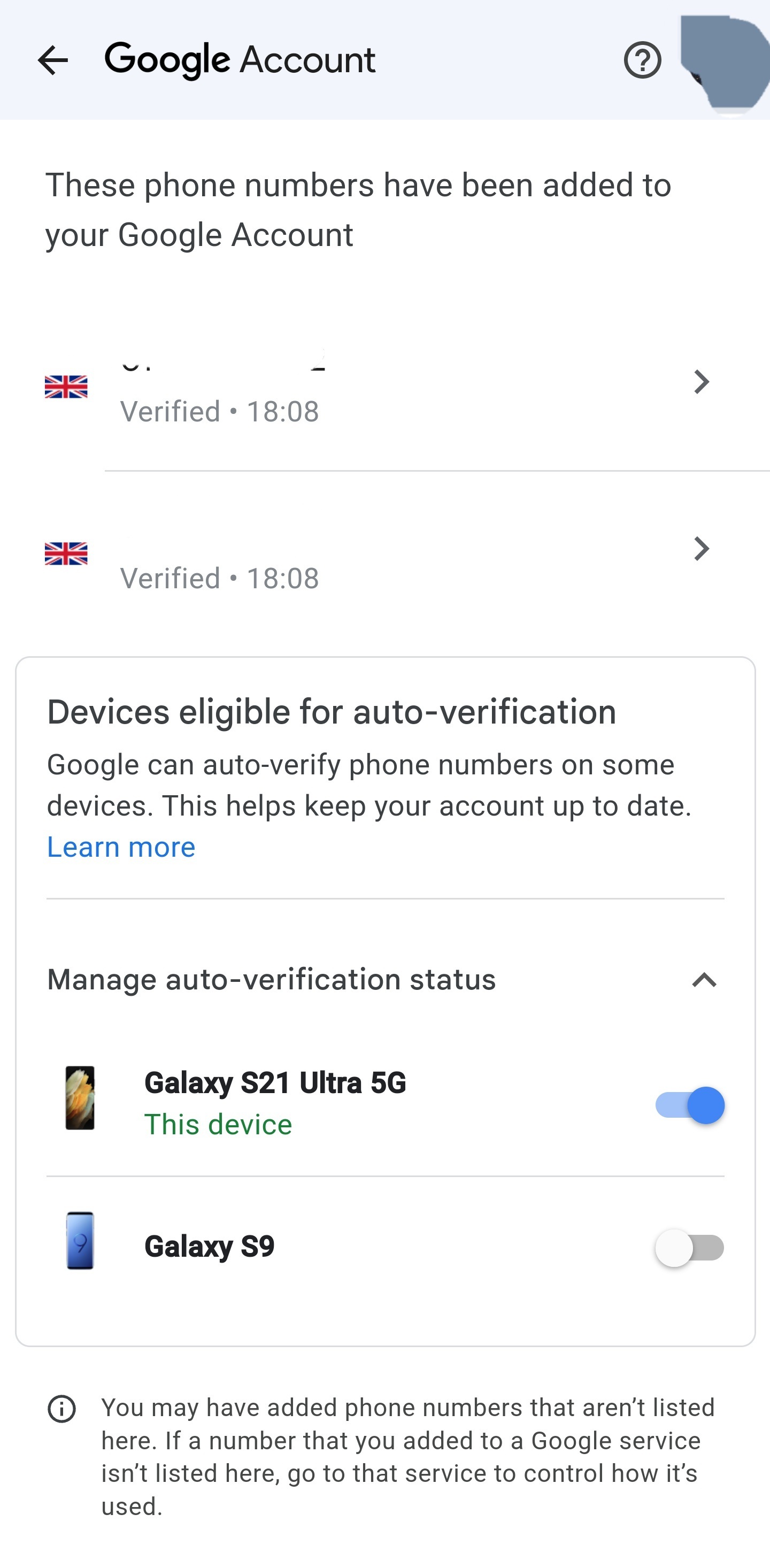
Thanks @MrSquishie that worked for me I did put another sim in slot 2 which added another phone number tonight to my account, as wanted to see if it was my sim after trying for days to get it to work. I only had my correct number on my account till then. I turned on auto verification for my device under manage auto verification status and that seems to have solve it. 


Hope this helps someone

Thanks again.


14 replies

andewhite
Platinum 
Contributor
Platinum 
Contributor
March 24, 2023

By default RCS chat is ON these days, assuming you’re using the Google Message app, then apparently the following worked for another forum member: 

  1. Turn OFF “Chat features” in Messages app.
  2. Turn OFF phone for at least 15-minutes.
  3. Restart phone, and turn “Chat features” back ON - Google then asks for the correct number for RCS chat.

🍀


Forum member (non-iD).
GWi11Author
Community Member
March 27, 2023

Thanks Ade tried this already with no luck. It asks for my number,, I enter correct number then I press verify my number and boom fires up chat with temp number 🙈

andewhite
Platinum 
Contributor
Platinum 
Contributor
March 27, 2023

Okay @GWi11, assuming you’re using Google Messages app, another forum member solved this issue by:

  1. Downloading another messaging app (e.g. Samsung Messages from the Galaxy store, or QKSMS from Play store), and setting that as your default messaging app (temporarily).
  2. Send a text to a family member or friend as a test.
    Wait for a response to your message (might not need to do this).
  3. After sending and receiving using Samsung Messages app (or other app), open Google Messages app and set it as default again, and repeat step (2).
    Hopefully you’ll now be sending from your ‘old’ number (the one transferred to iD by PAC).

Just a double-check - you’ve used Google page https://messages.google.com/disable-chat, to deregister the number you initially received from iD Mobile (before transferring your number from O2)?

Anyway, good luck @GWi11.


Forum member (non-iD).
Mohammed H
iD Mobile Employee
iD Mobile Employee
March 29, 2023

Hello @GWi11,

The suggestion from @andewhite may manually fix this as I know it helped a previous user on the Community before.

Sometimes it does take time for the number to update on Google’s servers so it should fix itself over time.

Mohammed


Did my comment help answer your question? If so, don't forget to mark the response as the Most Helpful Answer.
Meryvn
New Contributor
New Contributor
July 13, 2023

How long should this take as i have the same issue with a number ported from Three, and RCS is only working on the idMobile SIM number that i’ve now ported across.


I can’t deregister the temporary idMobile number from the Google page as it needs a verification code sent through SMS and as this number has been changed to the ported number from Three!

andewhite
Platinum 
Contributor
Platinum 
Contributor
July 13, 2023

How long should this take as i have the same issue with a number ported from Three, and RCS is only working on the idMobile SIM number that i’ve now ported across.

I can’t deregister the temporary idMobile number from the Google page as it needs a verification code sent through SMS and as this number has been changed to the ported number from Three!

Judging by the many forum posts about this topic, if the number registered to the Android device (by Google’s RCS servers) is ‘lost’ there doesn't appear to be a guaranteed way to fix the issue @Meryvn.

If you can live without RCS message features, then just turn OFF the “Chat features” option in the Messages app.

What Android device are you using @Meryvn
Do the device manufacturer’s community or support pages offer any tips or solutions for this?


Forum member (non-iD).
Meryvn
New Contributor
New Contributor
July 15, 2023

Ideally I don't want to live without RCS messaging. I'm using a Pixel 6a phone but have got RCS working on a few phones from a Pixel 3 to a Pixel 6 and and Oppo phone with no issues.


I wonder if getting a new SIM through with my ported number might work?


I'll also check the Google forums for any advice on this?

andewhite
Platinum 
Contributor
Platinum 
Contributor
July 15, 2023

You should be able to use RCS messaging @Meryvn, if Google can link the correct number with your Pixel 6a device. 

Google have linked the initial iD mobile number to your handset, and apparently haven’t recognised your Pixel device is now using the same SIM card, but with the number you transferred to iD.


Forum member (non-iD).
Kash M
iD Mobile Employee
iD Mobile Employee
July 18, 2023

Hi @Meryvn,
Welcome to the Community!

We hope that the information that @andewhite provided has helped.

You could contact Google for further assistance but we can’t advise if they’ll be able to get it sorted.


Kash

Did my comment help answer your question? If so, don't forget to mark the response as the Most Helpful Answer.
MrSquishie
New Contributor
New Contributor
July 28, 2023

I found that I needed to change some personal details in my Google account.

Go to your phone’s ‘Settings’ → Google → Manage your Google Account → Personal info → scroll until you see ‘Contact info’ and ‘Phone’. Remove the new number that would have been assigned temporarily with the new SIM.

You should then see a button to verify your device number next to your old ported number. If not, toggle the auto-verification off then on.

It is definitely convoluted and stupid that these settings aren’t just shown within the Messages app’s RCS settings.

