
Question

new to ID and Making calls

  • April 27, 2026
  • 1 reply
  • 5 views

  • Community Member

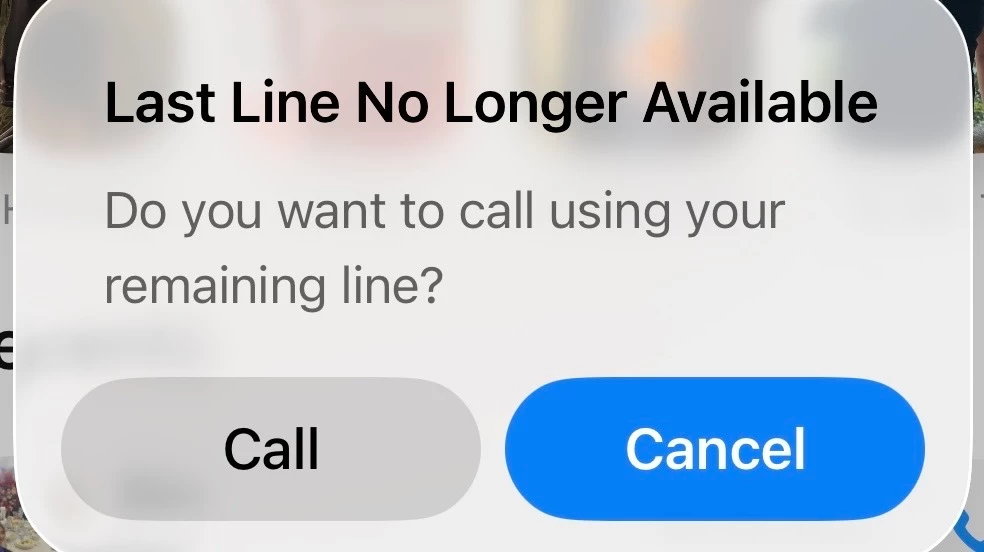
I have just switched over to ID from another network provider and when making calls via my iPhone I get the message shown below.

how do I stop this ? 
 

1 reply

Gemma M
iD Mobile Employee
Forum|alt.badge.img+8
  • iD Mobile Employee
  • April 27, 2026

Hi ​@Herj,


Welcome to iD Mobile! I am so sorry to hear of the issues that you are experiencing with making calls. 


The “last line no longer available” error on iPhone usually happens when there’s still a reference to your old network or SIM on the device. First, make sure that:

  • Your old network SIM has been fully removed from the phone
  • Only your iD Mobile SIM is inserted and activated


Once that’s done, here are a few steps that should help clear the issue:

  • Go to Settings > Mobile Data > Default Voice Line and make sure your iD SIM is selected
  • Head to Settings > Mobile Data > Mobile Data Options and ensure everything is set to your iD line
  • Try going to Settings > General > Transfer or Reset iPhone > Reset > Reset Network Settings (this will remove saved WiFi passwords, so just keep that in mind)
  • Restart your iPhone after completing the reset


If you are still having issues after trying the above, please let me know so that we can look into the next option. 


Regards,


Gemma M

The iD Mobile Social Media Team

