

Voicemail doesn't text us the number that rings us. | iD Mobile Community
Skip to main content
Question

Voicemail doesn't text us the number that rings us.

  • November 14, 2025
  • 7 replies
  • 27 views

MickRoberts
Active Contributor
Forum|alt.badge.img

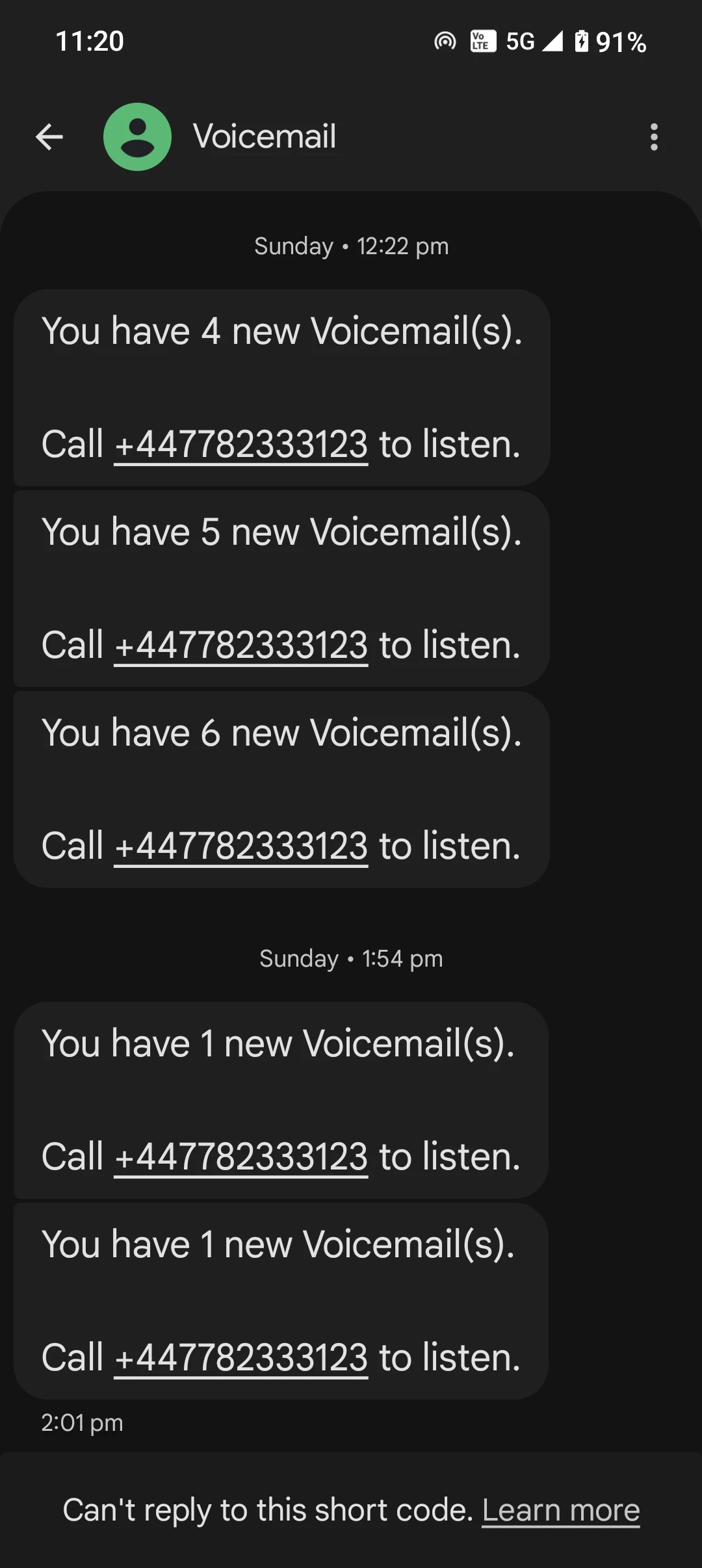
I'm listening to voicemail, & there seems no way for it to text you the number that left the voicemail-This is standard across all networks.

When you go into the other menu's of the voicemail, it's impossible to get out the sub menu's to get to the first menu where you can delete the message.

When you are on a plane or bad signal, & person doesn't leave a voicemail, ID Mobile texts us the phone number of the person. However, it does it in the wrong format, it texts 44 7976 735XXX . This is incorrect as when we ring the number , it says the number is non existent. It won't ring the number without the +44 at the beginning.

How can ID Mobile get all this so wrong?

And when you logging in on PC, you press log in, & it takes 3 pages-Why?  1st page after you click says Let's get you started-Why? 

Someone please prove me wrong, if not, then ID Mobile, please your people who should bring these things in, will never know unless you tell them.
Can someone tell ID Mobile this please, as I feel their overseas workers are going to reply on here with the incorrect information again.


7 replies

Geluk
Silver Contributor
Forum|alt.badge.img+10
  • Silver Contributor
  • November 14, 2025

Never had texts on either 3 or EE.


Forum|alt.badge.img+5
  • iD Mobile Employee
  • November 14, 2025

Hi ​@MickRoberts ,

Here are a few troubleshooting steps that might help:

Voicemail Navigation
-Dial 123 to access your voicemail.
-Use the ‘*’ (star) key to return to the main menu from any submenu.
-If you’re unable to exit menus, hang up and redial to start fresh.

Number Formatting Issue (+44)
-When you receive a text with 44 7976..., simply add a ‘+’ before 44 when dialing (e.g., +44 7976...).
-Alternatively, save the number in your contacts with the correct international format.

Login Process on PC
-Clear your browser cache and cookies.
-Try using a different browser or incognito mode.
-If the login still takes multiple steps, ensure you’re using the latest version of the site: https://www.idmobile.co.uk/.

Lamiya
iD Mobile Team


JoeKing
Silver Contributor
Forum|alt.badge.img+11
  • Silver Contributor
  • November 14, 2025

@MickRoberts  I've never ever had a text from voicemail stating the callers number, it's always been my voicemail number see below. But within the voicemail message once you've called the voicemail it will state the phone number of the caller in the announcement and then play the message left. 


Joe🙂


MickRoberts
Active Contributor
Forum|alt.badge.img
  • Author
  • Active Contributor
  • November 14, 2025

Never had texts on either 3 or EE.

Yes, EE you’d press I think it was 3,4 or 5 to send you the callers number.


MickRoberts
Active Contributor
Forum|alt.badge.img
  • Author
  • Active Contributor
  • November 14, 2025

Hi ​@MickRoberts ,

Here are a few troubleshooting steps that might help:

Voicemail Navigation
-Dial 123 to access your voicemail.
-Use the ‘*’ (star) key to return to the main menu from any submenu.
-If you’re unable to exit menus, hang up and redial to start fresh.

Number Formatting Issue (+44)
-When you receive a text with 44 7976..., simply add a ‘+’ before 44 when dialing (e.g., +44 7976...).
-Alternatively, save the number in your contacts with the correct international format.

Login Process on PC
-Clear your browser cache and cookies.
-Try using a different browser or incognito mode.
-If the login still takes multiple steps, ensure you’re using the latest version of the site: https://www.idmobile.co.uk/.

Lamiya
iD Mobile Team


Thanks Lamiva,

You didn’t answer the question about not receiving a text of the callers number.

Yes I don’t want to hang up & start again, that’s the whole point. I’ll try the star key next time thank you.

Yes, again that is the whole point, why don’t ID Mobile simply put the +44 in it? Why go to all that work, trouble, to send us the number, but then simply not send us the correct number? We dial it & it doesn’t work, & we have to start again. 
The number is already saved as the person, you send us the incorrect number to dial directly from the text,

You’ve got everything wrong about the logging in, as I suspect you are overseas. Please try it, then answer me. No​@WelshPaul will come on soon to correct you.


MickRoberts
Active Contributor
Forum|alt.badge.img
  • Author
  • Active Contributor
  • November 14, 2025

Hi ​@MickRoberts ,

Here are a few troubleshooting steps that might help:

Voicemail Navigation
-Dial 123 to access your voicemail.
-Use the ‘*’ (star) key to return to the main menu from any submenu.
-If you’re unable to exit menus, hang up and redial to start fresh.

Number Formatting Issue (+44)
-When you receive a text with 44 7976..., simply add a ‘+’ before 44 when dialing (e.g., +44 7976...).
-Alternatively, save the number in your contacts with the correct international format.

Login Process on PC
-Clear your browser cache and cookies.
-Try using a different browser or incognito mode.
-If the login still takes multiple steps, ensure you’re using the latest version of the site: https://www.idmobile.co.uk/.

Lamiya
iD Mobile Team


Thanks Lamiva,

You didn’t answer the question about not receiving a text of the callers number.

Yes I don’t want to hang up & start again, that’s the whole point. I’ll try the star key next time thank you.

Yes, again that is the whole point, why don’t ID Mobile simply put the +44 in it? Why go to all that work, trouble, to send us the number, but then simply not send us the correct number? We dial it & it doesn’t work, & we have to start again. 
The number is already saved as the person, you send us the incorrect number to dial directly from the text,

You’ve got everything wrong about the logging in, as I suspect you are overseas. Please try it, then answer me. No doubt ​@WelshPaul will come on soon to correct you.


JoeKing
Silver Contributor
Forum|alt.badge.img+11
  • Silver Contributor
  • November 14, 2025

@MickRoberts There are a few services that IDMobile doesn't offer compared to other networks as already mentioned.


Joe 🙂


MickRoberts
Active Contributor
Forum|alt.badge.img
  • Author
  • Active Contributor
  • November 14, 2025

@MickRoberts  I've never ever had a text from voicemail stating the callers number, it's always been my voicemail number see below. But within the voicemail message once you've called the voicemail it will state the phone number of the caller in the announcement and then play the message left. 


Joe🙂


Yes thanks, yes it does say the number which you have to write down frantically looking for a pen, some networks has option to press 4 to receive the callers number.


MickRoberts
Active Contributor
Forum|alt.badge.img
  • Author
  • Active Contributor
  • November 14, 2025

@MickRoberts There are a few services that IDMobile doesn't offer compared to other networks as already mentioned.


Joe 🙂

Yes thanks, I know these that piggyback the networks don’t offer all services, I thought ID mobile did do this one when I first joined them, it’s often hard to get an answer from the overseas staff if they can’t understand your question.