Day 1 on ID Network - Terrible Network. Why? | iD Mobile Community
Skip to main content
Answer

Day 1 on ID Network - Terrible Network. Why?

  • March 18, 2025
  • 4 replies
  • 93 views

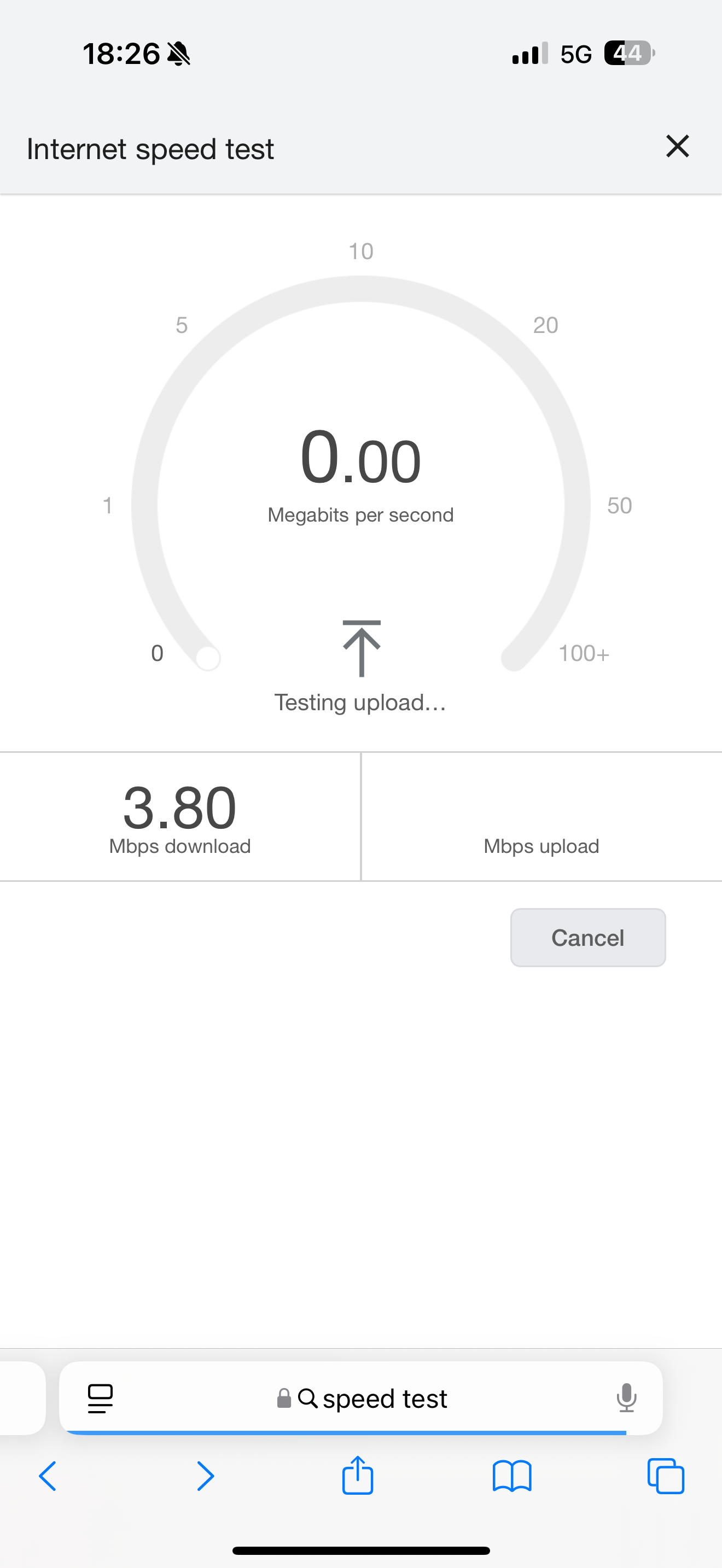
First day on ID network. In London and just went for a 15 minute trip to High Street. Everywhere I went saw 4G, 5G with minimum 3 bars on the brand new iPhone 16 series. But, there was no internet or terrible internet. Check the attached image. 5G with 3 bars. And a download speed of 3.8 Mpbs that barely made it. 

Whats the point of having all those gigs of data but no possibility to use it. 

Terrible terrible network. Will be moving out shortly unless someone can confirm if there was a problem today? 
 

Best answer by Tyler C

Hey there ​@paddypower


We’ll shortly send you a Private Message to your Community account so we can discuss your issue further.


To access your messages, click your profile picture in the top right hand corner and then click ‘Private Messages’.


Alternatively, if you are currently logged in, you can use the following link:


https://community.idmobile.co.uk/inbox/overview


Thanks,

Tyler

4 replies

MZone
Platinum 
Contributor
Forum|alt.badge.img+22
  • Platinum 
Contributor
  • March 19, 2025

Heard a lot of people state Three the network iD used in certain parts of London is poor and over congested. Like all networks different areas have different coverage/congestion issues.  


Tyler C
iD Mobile Employee
Forum|alt.badge.img+24
  • iD Mobile Employee
  • March 21, 2025

Hey there ​@paddypower, we’re sorry to hear that.


We hope the kind advice from ​@MZone has been able to help.


What’s your full postcode please?


Thanks,

Tyler


  • Author
  • New Contributor
  • March 21, 2025

Is there a way I can DM you the postcode instead of putting it here? 


Tyler C
iD Mobile Employee
Forum|alt.badge.img+24
  • iD Mobile Employee
  • Answer
  • March 24, 2025

Hey there ​@paddypower


We’ll shortly send you a Private Message to your Community account so we can discuss your issue further.


To access your messages, click your profile picture in the top right hand corner and then click ‘Private Messages’.


Alternatively, if you are currently logged in, you can use the following link:


https://community.idmobile.co.uk/inbox/overview


Thanks,

Tyler