
I'm experiencing ongoing poor interior network signal strength... | iD Mobile Community
Skip to main content
Question

I'm experiencing ongoing poor interior network signal strength...

  • August 4, 2025
  • 18 replies
  • 106 views

EFC
Active Contributor
  • Active Contributor

I contacted ID Mobile, regarding this issue. After some very basic troubleshooting which unfortunately didn’t help, they decided to send me a replacement SIM card. The new SIM card works as well as the one it replaced, but the problem is the interior network signal strength.

Public Wi-Fi is only feasible when it’s verified as being genuine and when it accepts VPN usage. Otherwise, the security concerns outweigh the benefits.

Are there any options regarding improving the signal strength?

Any help and advice gratefully received.

18 replies

Tom
iD Mobile Employee
Forum|alt.badge.img+25
  • iD Mobile Employee
  • August 5, 2025

Hi ​@EFC 


Sorry to hear this, the issue is only whilst indoors? Outdoors is okay?


Is this happening at all locations or a specific one(s)?


Tom


EFC
Active Contributor
  • Author
  • Active Contributor
  • August 5, 2025

Hi Tom

Outdoor signal strength has always been good.

Indoor signal strength (location dependent) varies from weak but useable to non-existent. It weakens the further I’m from windows or doors.

This is especially noticeable in supermarkets and other large interior open plan areas.

Eugenio


Tom
iD Mobile Employee
Forum|alt.badge.img+25
  • iD Mobile Employee
  • August 5, 2025

Hi ​@EFC 


Okay, with more barriers in the way of the signal to your device that is entirely possible to happen, please could you let us know the postcode(s) where you’re having these issues?


Tom


EFC
Active Contributor
  • Author
  • Active Contributor
  • August 5, 2025

Hi Tom

The issue is especially notable within shops in London, one example is Sainsbury’s Camden Town - NW1 9LJ. 

Interior signal strength with Virgin Mobile or O2 was weaker, but still useable.

Eugenio


Tyler C
iD Mobile Employee
Forum|alt.badge.img+24
  • iD Mobile Employee
  • August 5, 2025

Hi there ​@EFC, sorry to hear that. For this postcode, I can indeed see that Three UK are currently working on fixing an issue in this area at the moment. We're sorry for any disruption this may be causing.


We hope to have things fixed as soon as possible and will add any updates here.


https://www.three.co.uk/support/network-and-coverage/coverage?location=dh44ar&tab=2#tabs-c2d0d12ce8-item-2988999184-tab


Therefore, we’d expect weaker signal here whilst this is on-going. Furthemore, sometimes signal inside larger buildings/supermarkets, where there’s a lot of other people also, can cause for signal to be poorer than expected. I know for example, when I visit my local Tesco’s, the signal there shows it should be fine, but as soon as I enter, the signal is very weak, and that’s the same for everyone I know from different networks, just because of the type of building it is, and I know alot of supermarkets tend to be the same unfortunately, even when you’d expect good signal.


Do you have any other full postcodes you’ve been regularly experiencing issues in at all?


Thanks,

Tyler


EFC
Active Contributor
  • Author
  • Active Contributor
  • August 5, 2025

Hi Tyler

Issues are experienced at N1 9AL London Kings Cross Station & N1C 4QP St Pancras International.

It’s at these locations with the inconsistent interior signal strength, along with other examples such as railway stations & department stores on Oxford Street.

Thanks

Eugenio


Tyler C
iD Mobile Employee
Forum|alt.badge.img+24
  • iD Mobile Employee
  • August 5, 2025

Hi there ​@EFC, thank you for confirming. From all the postcodes you’ve mentioned thus far, they’re all inside places where the network(s) are being used by hundreds/thousands of people all at once, so it’s likely that due to the high usage at all times in these areas, the signal becomes weaker and restricted, especially when indoors. I can also see that work is on-going in the N1 9AL area, which will likely affect signal at the moment.


Do you ever notice poor signal when you’re just at home, or just out and about anywhere that’s not a department store or supermarket, on train station in London? No problem if not, but just asking for general investigation purposes.


Thanks,

Tyler


EFC
Active Contributor
  • Author
  • Active Contributor
  • August 5, 2025

Hi Tyler

The network signal at home or other interior spaces can range from 3 bars down to no signal.

Thanks 

Eugenio


Tyler C
iD Mobile Employee
Forum|alt.badge.img+24
  • iD Mobile Employee
  • August 5, 2025

Hi there ​@EFC, what’s the home postcode if you don’t mind me asking please, or any other you may have noticed?


Thanks,

Tyler


EFC
Active Contributor
  • Author
  • Active Contributor
  • August 5, 2025

Hi Tyler

Home postcode is NW1 9UD.

Thanks

Eugenio


Tyler C
iD Mobile Employee
Forum|alt.badge.img+24
  • iD Mobile Employee
  • August 5, 2025

Hi there ​@EFC, taking a look at your home area, you should receive good 4G signal indoors and outdoors, and potentially weak 5G outdoors. When you’re at home, are you connected to 4G only?


Also, have you attempted to restart your phone and also reset network settings when you notice the issue, to see if this helps improve speeds at all?


Also, what device do you have?


Thanks,

Tyler


EFC
Active Contributor
  • Author
  • Active Contributor
  • August 5, 2025

Hi Tyler

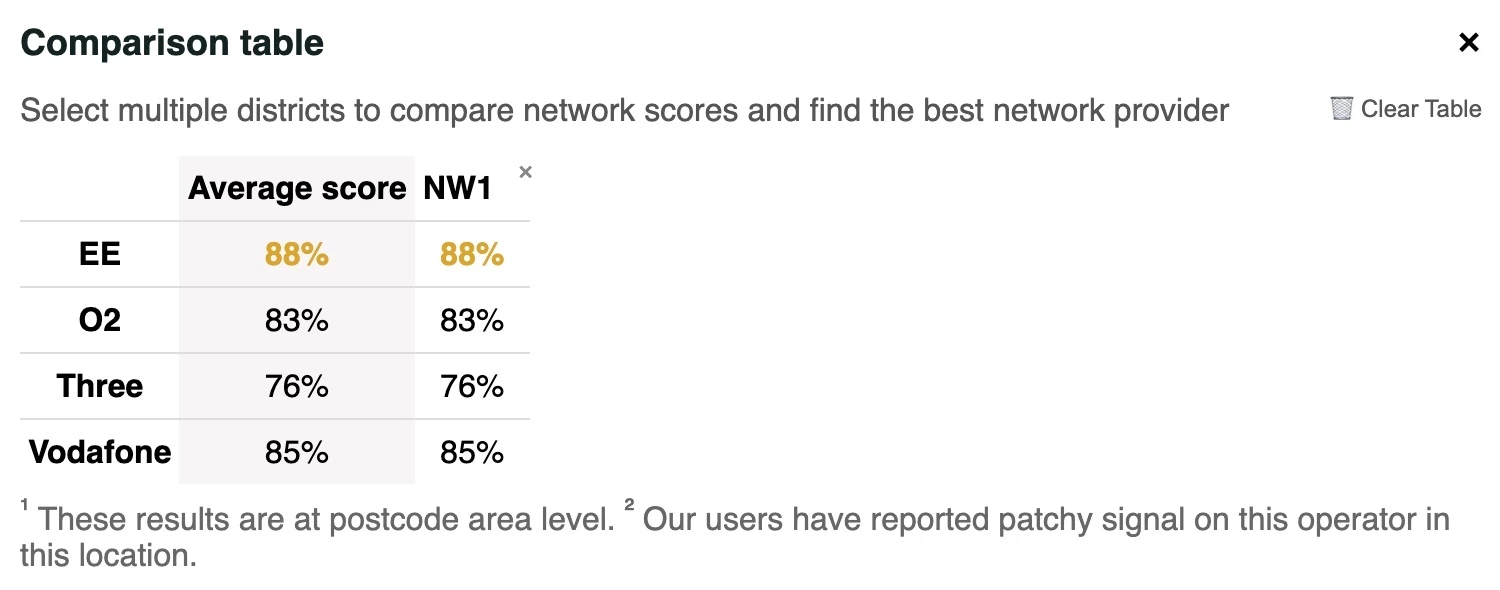
At home I’m always connected to WiFi on an iPhone XS, otherwise always using 4G. I’ve reset network setting and restarted the handset. The issue always comes down to network quality, as displayed on the Which? website, below.

Thanks 

Eugenio


Tyler C
iD Mobile Employee
Forum|alt.badge.img+24
  • iD Mobile Employee
  • August 5, 2025

Hey there ​@EFC, sorry to hear about the network quality.


What network speeds do you typically get at home please?


Thanks,

Tyler


EFC
Active Contributor
  • Author
  • Active Contributor
  • August 5, 2025

Hi Tyler

Network speeds are

Wi-Fi - DL: 67.8   UL: 16.7

G4 - DL: 10.8   UL: 3.22

Thanks

Eugenio


Tyler C
iD Mobile Employee
Forum|alt.badge.img+24
  • iD Mobile Employee
  • August 5, 2025

Hi there ​@EFC, to clarify, is the second speed test the one with your device/iD SIM card?


Thanks,

Tyler


EFC
Active Contributor
  • Author
  • Active Contributor
  • August 5, 2025

Hi Tyler

Yes.

First is Wi-Fi, second is SIM card - 4G.

Both are on iPhone XS.

Thanks

Eugenio


Siân W
iD Mobile Employee
Forum|alt.badge.img+19
  • iD Mobile Employee
  • August 6, 2025

Thanks ​@EFC 

We’ll shortly send you a Private Message to your Community account, so we can discuss your issue further.

To access your messages, click your profile picture in the top right hand corner and then click ‘Private Messages’.

Alternatively, if you are currently logged in, you can use the following link: https://community.idmobile.co.uk/inbox/overview 

We’ll see you there.


EFC
Active Contributor
  • Author
  • Active Contributor
  • August 6, 2025

😁👍